
Instrument Expert
Original factory packaging

Service Hotline:
(+86)010-52867771
Instrument Expert
Original factory packaging
Service Hotline:
(+86)010-52867771
Updated:2025-03-13
Views:3142
 WeChat
 QQ
QQ
 Online Service
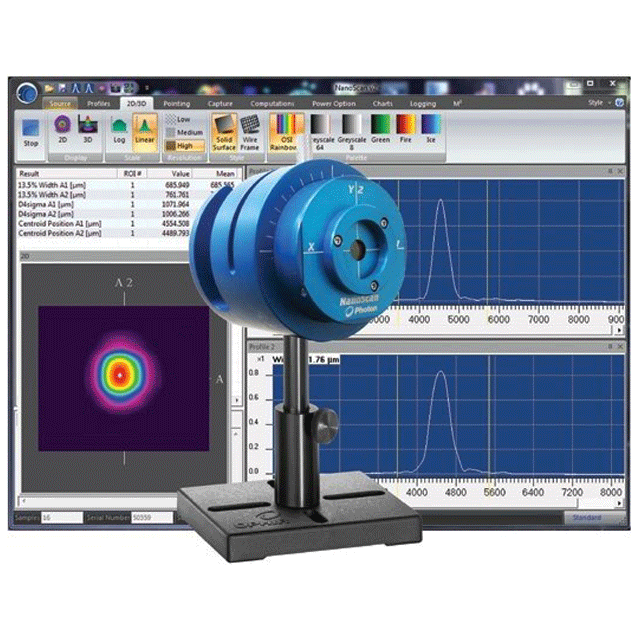
Beam Sizes of 20μm to ~6mm
Power Levels of ~10nW to ~10W
USB 2.0 Interface
NanoScan Standard or Professional software included
Scanning Slit Profiler: Silicon Detector, 9mm Aperture, 5μm Slits
| Wavelengths | 190-1100nm |
| Beam Sizes | 20μm - ~6mm |
| Interface | USB 2.0 |
| Sensor Type | Silicon |
| Compatible Light Sources | CW, Pulsed >25kHz |
| Power Range | ~10nW - ~10W |
| Slit Size | 5μm |
| Aperture Size | 9mm |
| Scanhead Size | 83mm |
| Compliance | CE, UKCA, China RoHS |
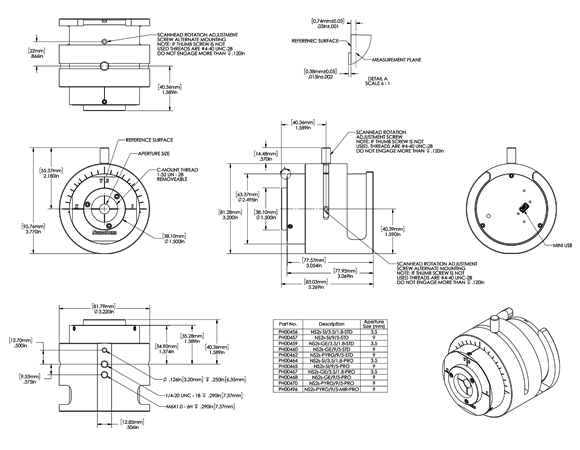
Where is the detector in the NanoScan?The detector is mounted internal to the NanoScan behind the rotating slits. This position is not important to the measurements. The measurement plane is the scan plane of the slits, which is nominally 0.74mm +/-0.025 mm from the Reference Surface on the front of the NanoScan. Please refer to the mechanical drawings in Appendix B of the NanoScan Operational Manual.
Why is the silicon NanoScan not recommended for 1064nm beam measurements?The silicon detector is very transparent to NIR light >1000nm. If it is used for measuring these beams, you will often see a tailing profile, because the signal does not decay fast enough. This will lead to erroneous results. We recommend using the germanium, or if there is enough power, the pyro electric detector for these wavelengths.
After setting up the NanoScan profiler and acquiring the beam, the profile is bouncing back and forth.This is usually caused by the Automatic ROI selection. After acquiring the beam, you should then uncheck the Auto ROI in the ROIs menu and the beam should stabilize.
Won't the NanoScan slit diffract the beam?Yes, but since the NanoScan measures all the light on the detector as a function of slit position, this does not affect the measurement results.
Can I get closer to the front of the NanoScan V2 since it has a new C-Mount adapter ring?The NanoScan V2 product is great for looking at focused spots, but sometimes the C-Mount ring that is on the front can get in the way mechanically. By removing the three retaining screws it will allow you to remove this ring so you can get mechanically closer to the front of the NanoScan V2. Care should be used when removing these screws and the ring so something does not fall down inside the input aperture of the NanoScan V2. It is recommended that if you are going to remove the C-Mount ring that you invert the NanoScan V2 so it is looking at the floor and then remove the screws and the C-Mount ring to allow gravity to work in your favor and pull them away from the input aperture.
My NanoScan system is giving me an error that says” The selected speed could not be set within 0.01%!” What does this mean?This means that the motor is not able to set the rotation speed to within 0.01% precision. This typically means that the motor is wearing out, or that something is causing the motor to not be able to rotate at a constant speed. This typically requires that the system come back to the factory for inspection and repair.
This could also mean that you are running the wrong software. If the NanoScan does not have a Mini USB connection on the head, it should not be run on NanoScan 2.4.X software. It should be run on version 2.1 SR1 software.
Can multiple NanoScans be run from the same PC, or can you connect multiple NanoScans and select the one you want to run?Actually, only one NanoScan can be run from the NanoScan software at a time. If you did connect multiple NanoScans, only one will be recognized and able to run, and the other(s) will not be selectable.
Customer Service QQ
Customer Hotline:
Technical Supports


 3003988120
 yiqi.com
 bio-equip.com
 b2bwork.baidu.com
 baidu.com